
Interface
Basic | Chat | Status | Friend | PK | Guild | Action | Trade | Team | Options
Action
Open the actions menu by selection "Action" from the Interface. You will see a list of actions open in a window:
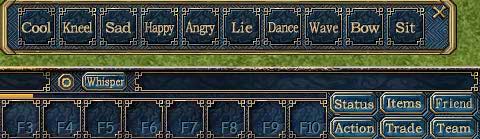
1. Click on one of the commands on action window.
2. Drag and drop one of the commands onto F1-F10 button, then press this key on keyboard.
3. Click on Options button, the Options window will appear, click on hotkey button to open hotkey window, select action from menu, and command from selection, Press Ctrl/Alt/shift + the target key, then click on restore or change to set hotkey. For example, if you set the cool hotkey to be Ctrl + Q, your character will show cool action after you press Ctrl + Q.