
Interface
Basic | Chat | Status | Friend | PK | Guild | Action | Trade | Team | Options
Guild
|
1. Operation:
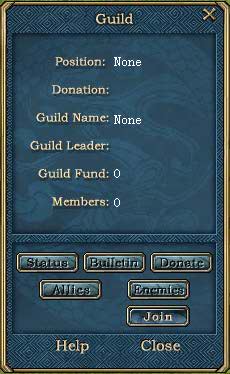
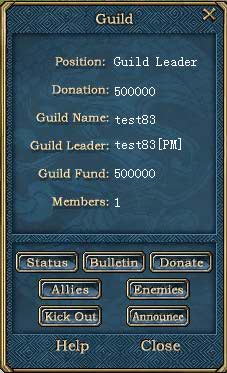
Guilds are large player organizations within the game, usually geared towards a specific goal, purpose, or play-style. Click on guild button to open the guild window. The buttons within the Guild window have the following functions: Status: Click on this button to view the basic status of your guild.2. Position: Display your current position in your guild. There are three positions: guild leader, deputy leader, member. Guild Leader: The leader of a guild has the privilege of managing the guild, and can kick out anyone he/she wants. 3. Donation: Displays the amount you have donated to your guild. The more you donate, the more likely you are to get a good position within the game. 4. Guild Name: Displays the guild's name. 5. Guild Leader: Displays your guild leader`s name. 6. Guild Fund: Displays the amount of funds your guild has at its disposal. 7. Members: Displays the number of your guild members that are currently a part of your guild. |
|