
Interface
Basic | Chat | Status | Friend | PK | Guild | Action | Trade | Team | Options
Trade
How can I buy an item: You can buy items from NPCs and sell the items that you do not want any longer to some NPCs.
1. Click on the merchant NPC who is selling the item you want. His/Her inventory will be on the left, and yours on the right.
2. Right click on the item you want to buy or drag it to your inventory.
How can I sell an item: Drag an item from your inventory into the merchant inventory.
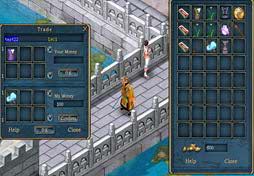
If you have items to exchange with others, you trade with them: i. Click on the "Trade" button in the interface. |
|
Confirm: Type the amount of money and/or CP in the boxes, then click on "Confirm" to trade. Be aware that once you confirm the amount, you are unable to change it. The only way to change the amount is to cancel the current trade and start again.
Okay: Drag your items to the trading window, check if the money is right, then click on "Okay". If the other party clicks on "Okay" too, then the trade is completed.